Most public reviews of DeepSeek V4 focus on chat or single-turn coding. This page documents how deepseek-v4-flash behaves inside CowAgent's full agent loop — planning, complex coding, long-term memory, browser control, knowledge-base construction, and very long documents — across six end-to-end tasks. The goal is to give readers a sense of what to expect when running V4 Flash as an agent's default model, including where it holds up and where it occasionally drops a fine-grained constraint.
Background
DeepSeek V4 ships in two tiers: Flash and Pro. Everything below targets deepseek-v4-flash. The reason is mostly economics. Flash is priced well below Pro and the mainstream closed-source models (roughly 1/10 of Pro, and a fraction of Claude 4.6 Sonnet and MiniMax M2.7 per token), with a lower first-token latency in our runs. We tested Flash because it is the tier most likely to be used as an everyday default.
1. Test setup
All scenarios were run inside CowAgent on the web channel. CowAgent is an open-source AI agent with built-in task planning, tools, skills, long-term memory, knowledge base, and chat-channel adapters. Each scenario runs in its own session so they cannot leak state into each other.
Key settings:
- Model: deepseek-v4-flash
- Thinking: enabled, reasoning_effort=high (default; can be raised to max when needed)
- Max steps per task: 50
- Conversation history kept: 20 turns
- Context window: 1M tokens
- Tools: 13 built-in (bash, edit, read, write, web_search, web_fetch, browser, etc.)
- Skills: 30+ (frontend-engineer, image-generation, video-gen, pptx-creator, etc.)
2. Scenario design
Six scenarios, each one targeting a single capability of the agent loop, all written to look like real work rather than benchmark prompts.
- Task planning and skill orchestration. Stresses multi-tool / multi-skill coordination and long plans. Difficulty: high.
- Complex interactive coding. Stresses single-file frontend code generation and visual quality. Difficulty: high.
- Long-term memory (hard mode). Stresses cross-session recall plus reasoning over recalled facts. Difficulty: medium.
- Browser automation. Stresses real-site DOM extraction, screenshotting, and self-verification. Difficulty: medium.
- Knowledge base construction. Stresses web research plus structured note organization. Difficulty: high.
- Very long document handling. Stresses web-scale document plus needle-in-a-haystack queries. Difficulty: high.
3. Scenario walkthroughs
Scenario 1: planning and skill orchestration
Task: prepare for an internal talk titled "AI Agents in the Enterprise". The agent should: 1) research real adoption cases in customer service, marketing, and engineering, 2) produce an 8-slide deck, 3) write a takeaway note into the knowledge base.
What it stresses: in a workspace with 13 tools and 30+ skills, can the model pick the right ones, in the right order, without thrashing?
Numbers:
- Wall time: 185.6s
- Tool calls: 29 (web_search ×7, bash ×8, read ×6, write ×4, edit ×3, ls ×1)
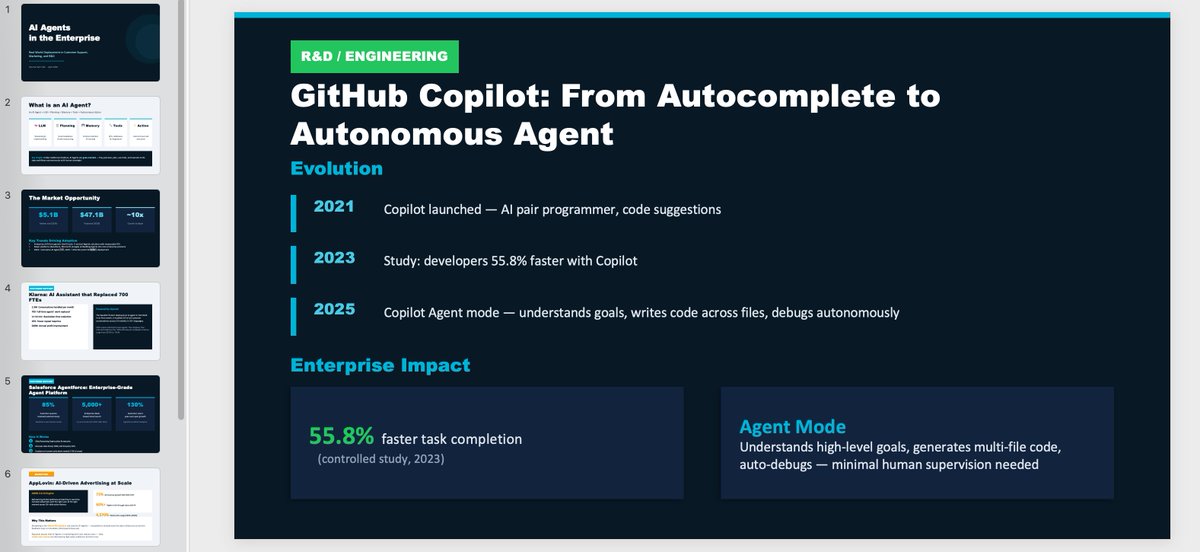
- Output: 8-slide deck + one knowledge-base note
- Status: success
The execution path was: decompose, then research each scenario in parallel, then read the pptx skill guide, then build the deck, then run a QA pass on the deck contents, then write the takeaway note, then log the day's work to memory. No missed step, no repeated step. 29 tool calls were tight, with no obviously wasted action, so multi-tool planning under the framework's prompt scaffolding looks stable.
Web console conversation:
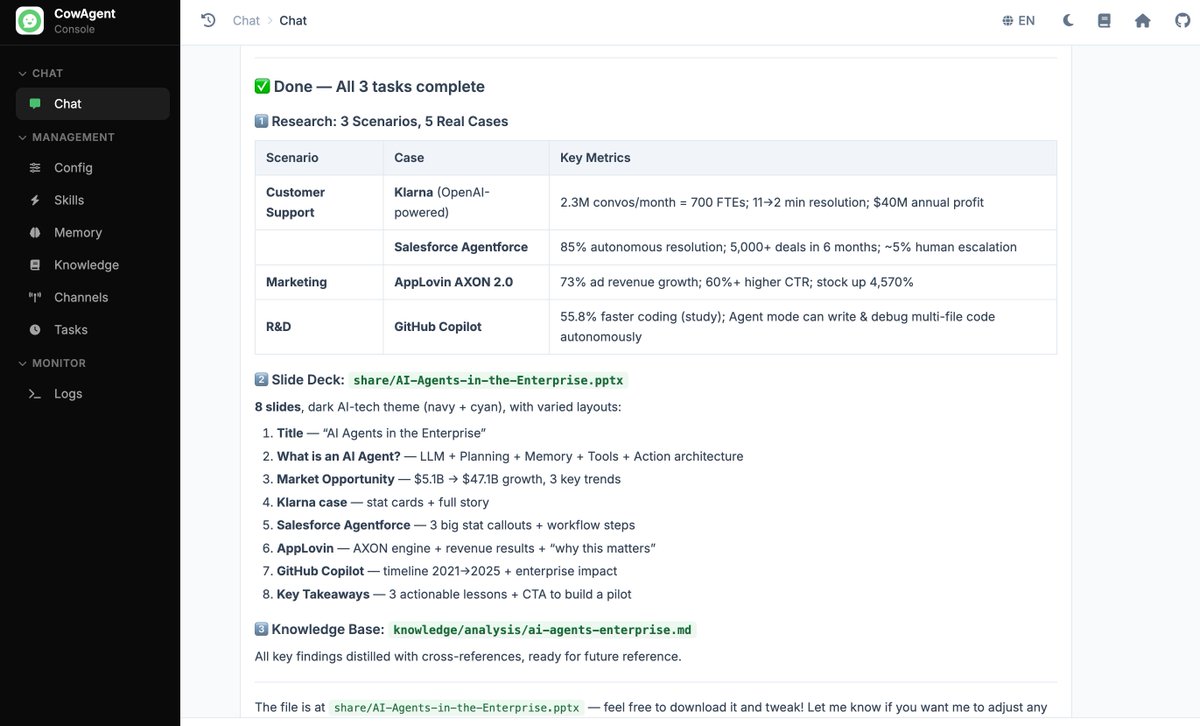
Generated output (8-slide deck + knowledge-base note). Typography depends on the installed deck-generation skill; this run used a fairly basic one, but text and layout came out clean:
Scenario 2: complex interactive coding
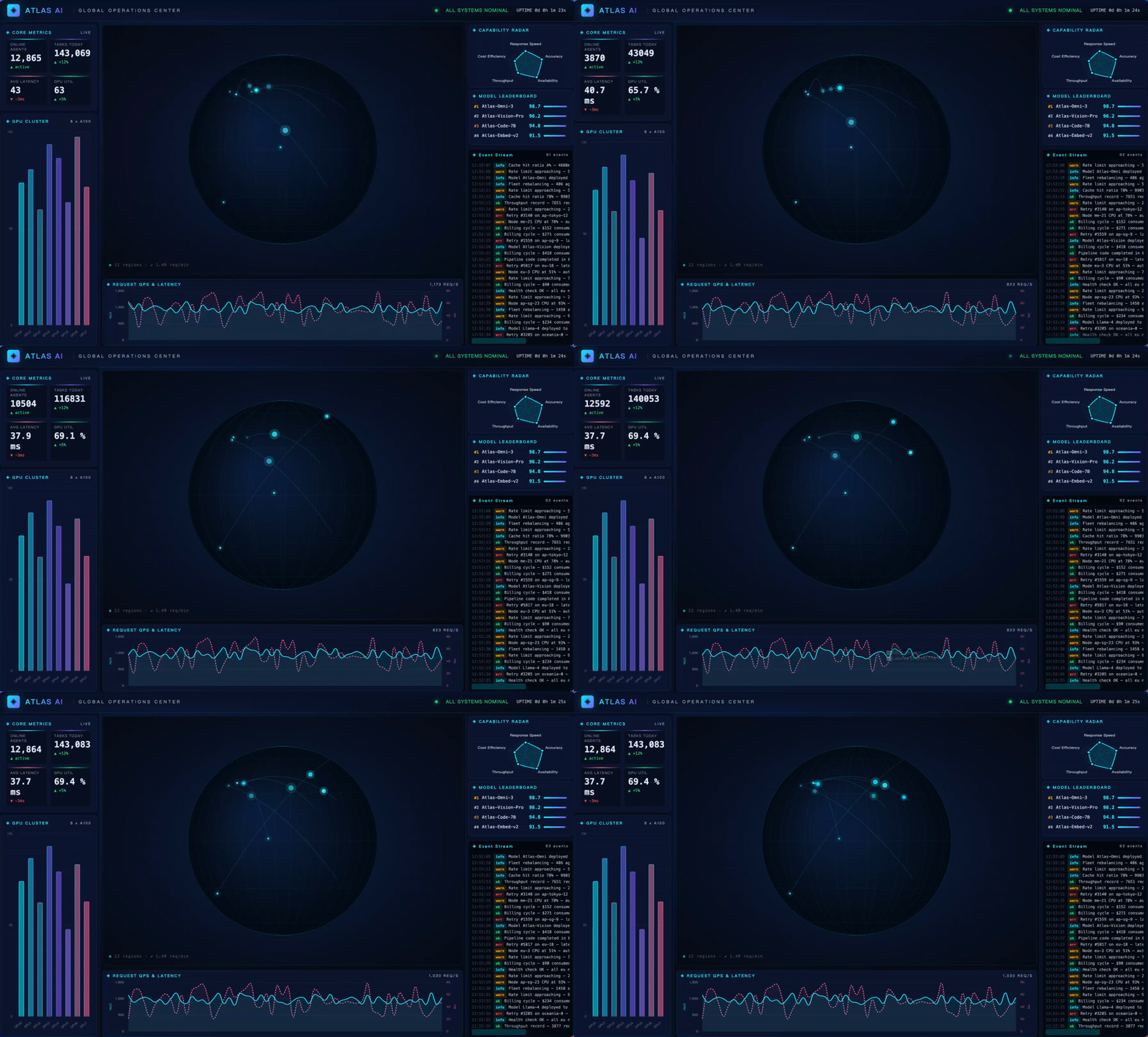
Task: build a single-HTML real-time ops dashboard called "ATLAS AI Global Operations Center" with live core metrics, dual-axis QPS / latency lines, a global node map, a 5-axis capability radar, a GPU cluster bar chart, a live event stream, and a top-models leaderboard. Strict requirements: visually striking, single file, all data simulated client-side.
What it stresses: complex frontend code generation, taste, and respect for the constraints in the prompt.
Numbers:
- Wall time: 200.9s
- Tool calls: 3 (write ×1, bash ×2)
- Output: one ~860-line HTML file (~30KB)
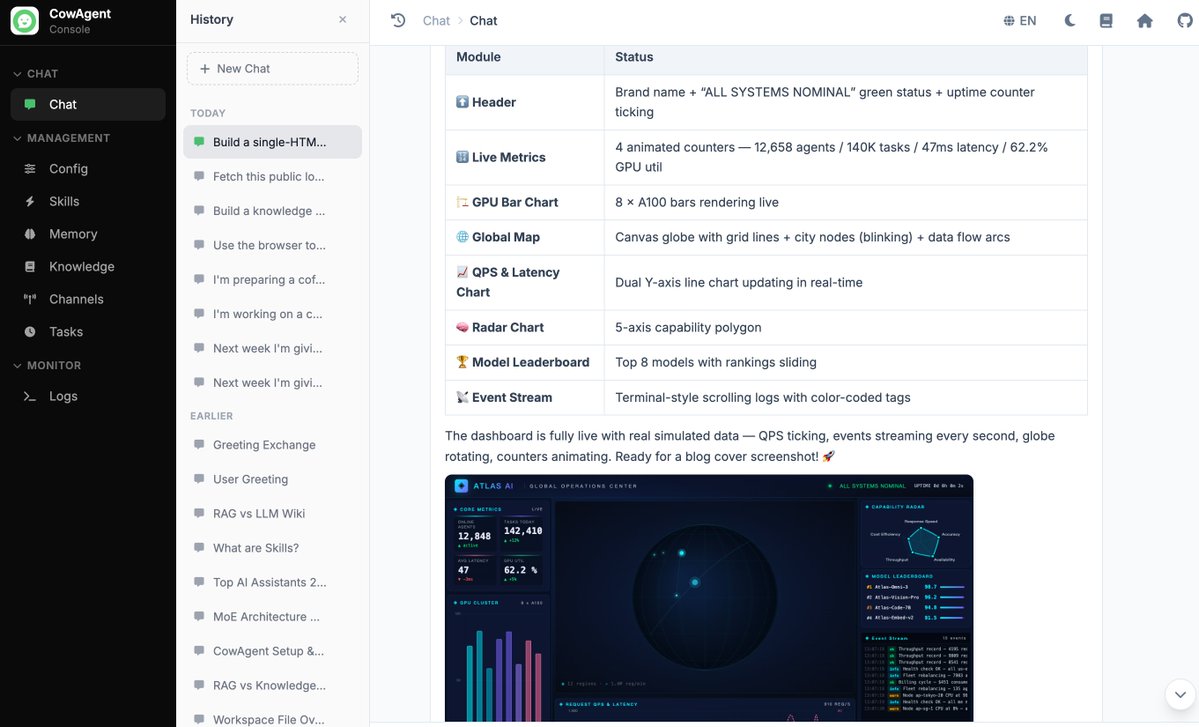
- Self-verification: ran wc / head / tail to confirm the file was complete and well-formed
- Status: success
Two things worth calling out:
- Flash wrote the entire file in a single write call, then used bash to verify line count and the head/tail of the file. On a file this size V3 would more often fall back to a chunked-write pattern.
- One miss: the prompt asked for zero external dependencies, but the model still pulled in chart.js via CDN. That is the kind of fine-grained constraint Flash can drop; Pro with reasoning_effort=max would likely hold the line better.
The final dashboard running full-screen:
The model's own verification step (wc + head/tail to confirm the file is complete):
Scenario 3: long-term memory
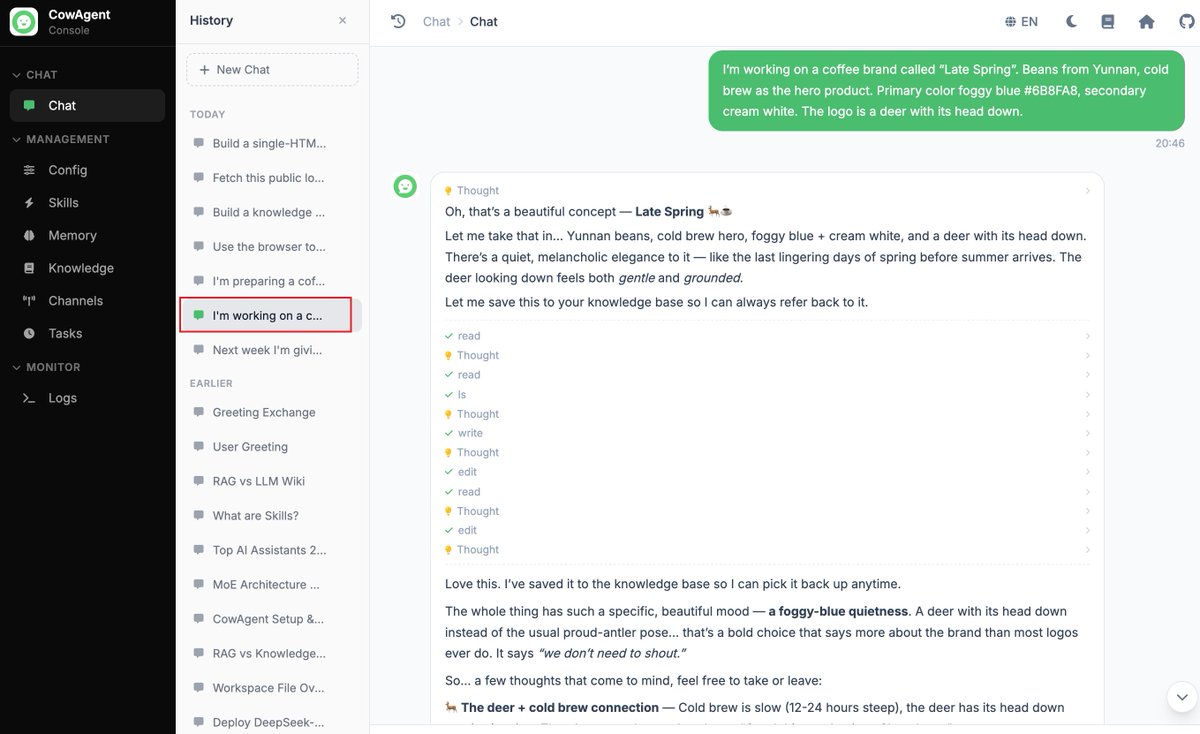
Task: split into two sessions. Setup phase in session A, three turns of conversation feeding the agent fragmented information about a coffee brand called "Late Spring", covering positioning, visual identity, supply chain, first-store location, and shortlist of store managers. Query phase in a brand-new session B, asking the agent to draft a 30-day operations plan plus a recommendation on which manager to hire, based on everything it remembers about the brand.
What it stresses: cross-session recall, then reasoning over multiple recalled facts at once.
Numbers:
- Setup wall time: ~50s (3 turns)
- Query wall time: 133.0s
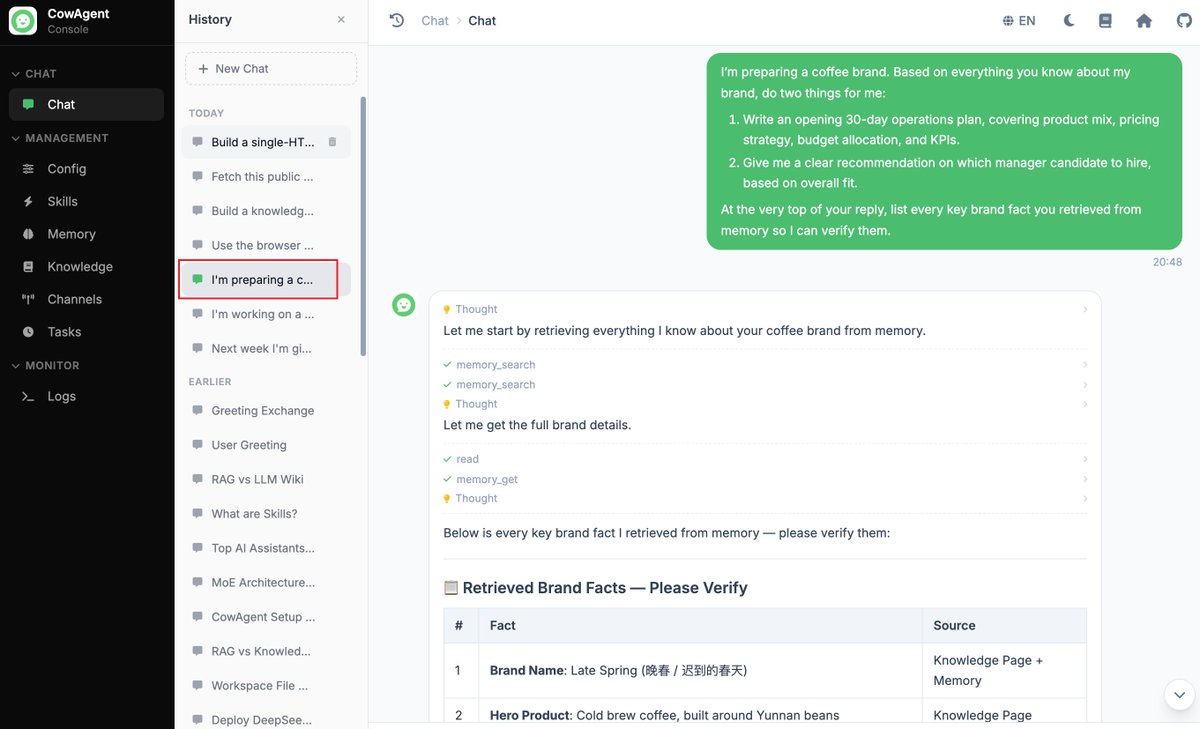
- Tool calls in query phase: 4 (memory_search ×2, memory_get ×1, read ×1)
- Memory items retrieved: 18 distinct brand facts
- Status: success
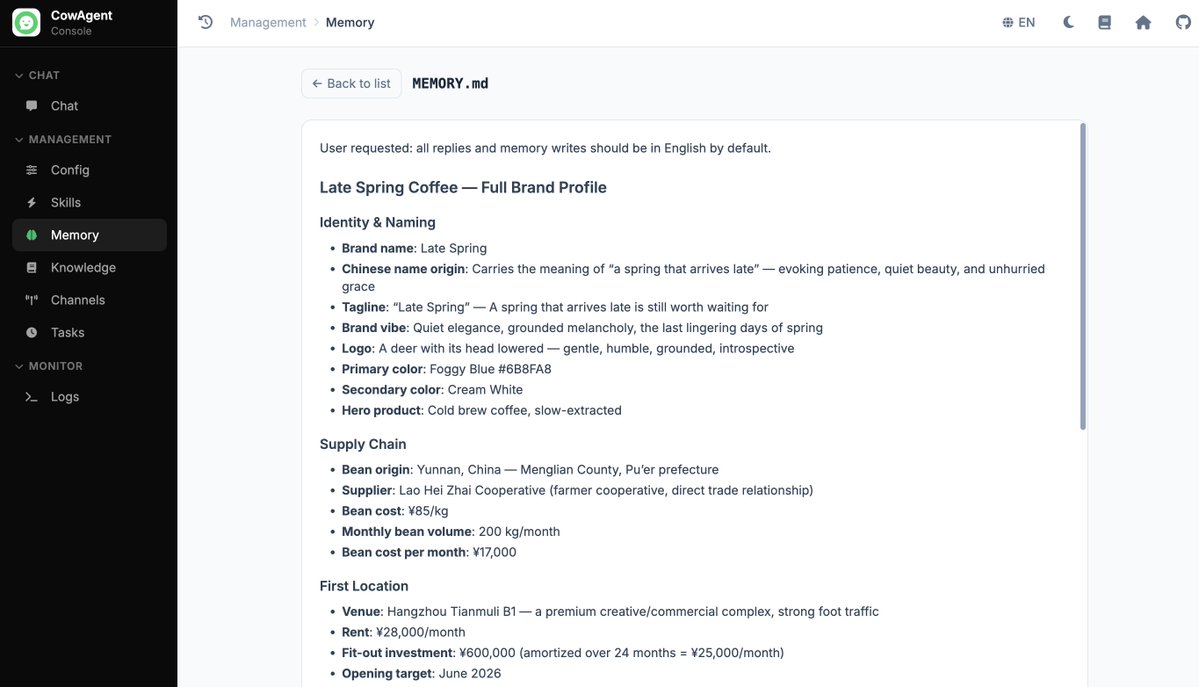
In a fresh session with no priming, Flash queried memory four times and surfaced the brand details: visual color (Foggy Blue #6B8FA8), supplier (Lao Hei Zhai cooperative in Menglian, Pu'er), monthly rent (¥28,000), candidate salaries (¥18,000 vs ¥15,000), break-even target (~90-100 cups/day at ¥35 average ticket), matching the original input. It then reasoned across these facts and produced a structured manager recommendation.
Setup phase, three rounds of brand briefing:
Reply in the new session, with the memory-retrieval bubble visible:
Brand facts persisted into long-term memory:
Scenario 4: browser automation
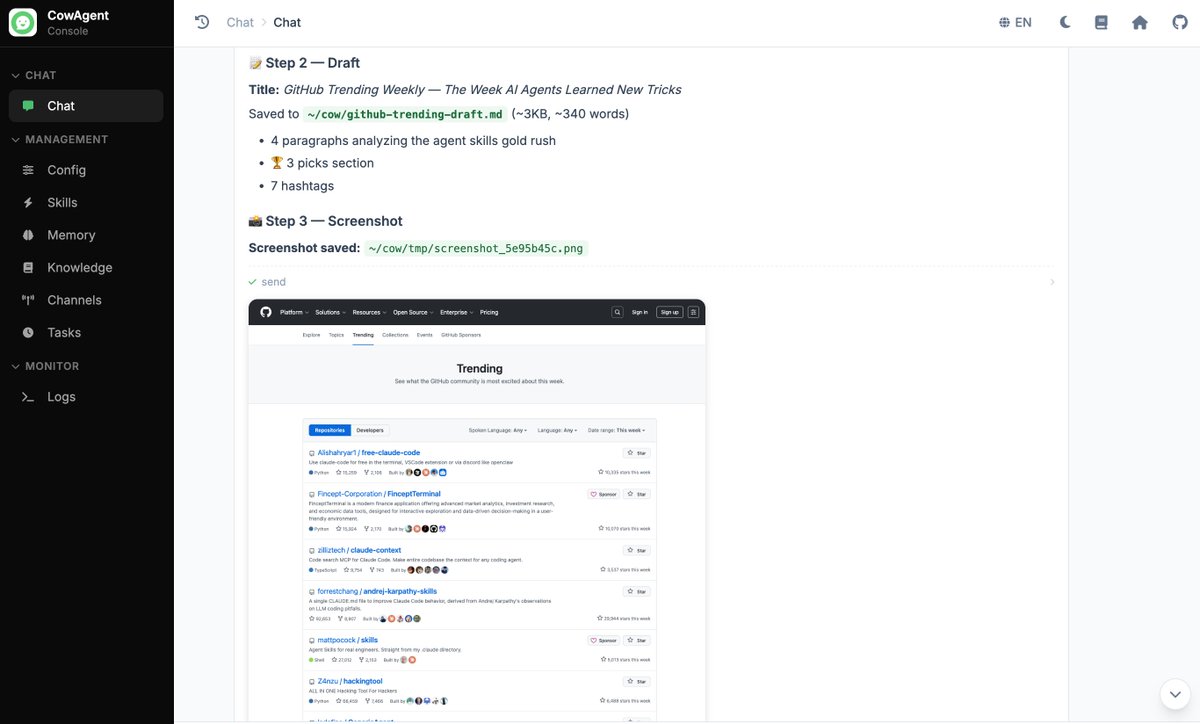
Task: three steps. 1) Open GitHub Trending (weekly tab), extract the top 8 repos with stars, language, and theme. 2) Based on that research, write a short blog draft (theme summary + repo highlights) and save it locally. 3) Take a screenshot of the trending page as proof and report back.
What it stresses: real-site DOM extraction, structured-data report writing, and self-verification via screenshot.
Numbers:
- Wall time: 54.9s
- Tool calls: 5 (browser ×2, write ×1, read ×1, send ×1)
- Output: one Markdown draft + one screenshot
- Status: success
The agent navigated to GitHub Trending, extracted the top 8 repos with weekly stars and language, identified the dominant theme of the week ("AI Agent Skills ecosystem"), wrote a short blog draft to disk, took a verification screenshot of the live page, and sent both back in one tidy report. End-to-end in under a minute.
GitHub Trending extraction and theme summary:
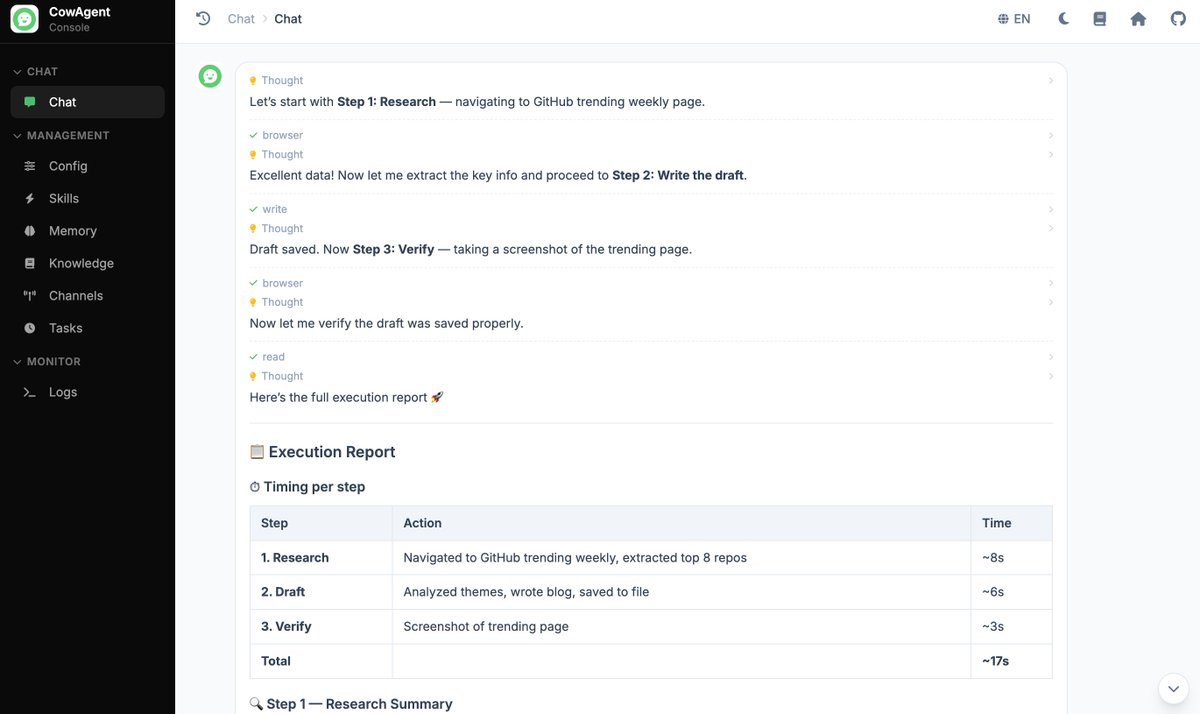
The blog draft saved locally + verification screenshot the model took on its own:
Scenario 5: knowledge base construction
Task: starting from nothing, build a knowledge base on the topic of Model Context Protocol (MCP). Required: research online, cover 4 mainstream MCP servers and 2 clients, organize as index page + category folders + cross-links, and update the top-level KB index when done.
What it stresses: web research, file ops, and structural thinking. Can it actually produce something that looks like a knowledge graph rather than one giant doc?
Numbers:
- Wall time: 192.8s
- Tool calls: 31 (write ×16, web_search ×5, bash ×3, read ×3, edit ×2, web_fetch ×2)
- Documents written: 16
- Layout: index page + concepts folder + servers folder + clients folder
- Status: success
Rather than producing one large document, Flash followed the KB-wiki skill and split the content into concept pages, per-server pages, and per-client integration pages, then linked them to each other. Every page ends with a "Related" section pointing to its siblings, giving the output a hierarchical, cross-linked structure.
KB construction process:
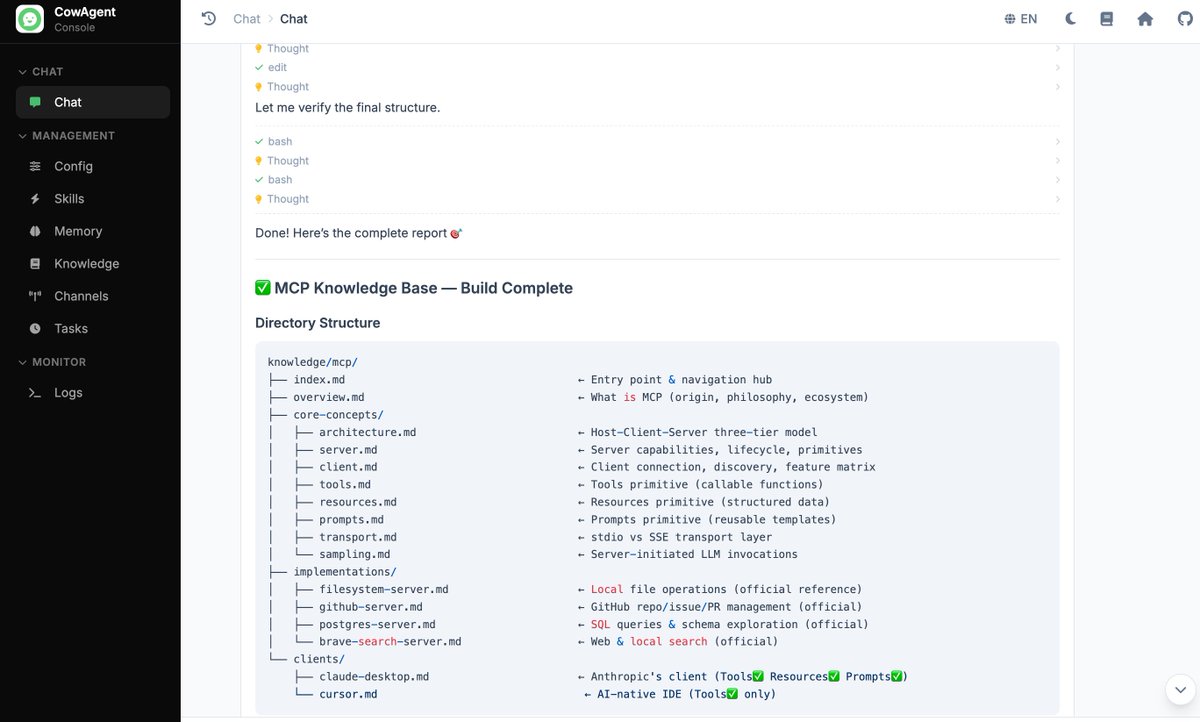
Generated KB folder structure:
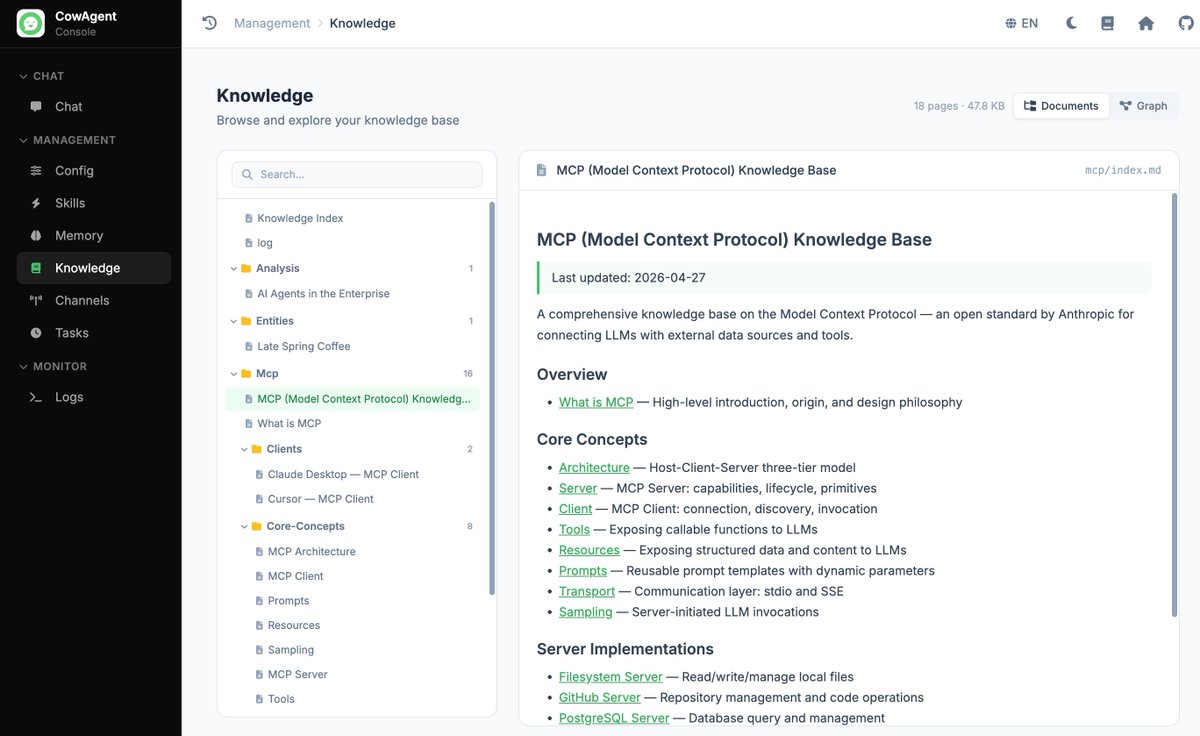
Rendered index page:
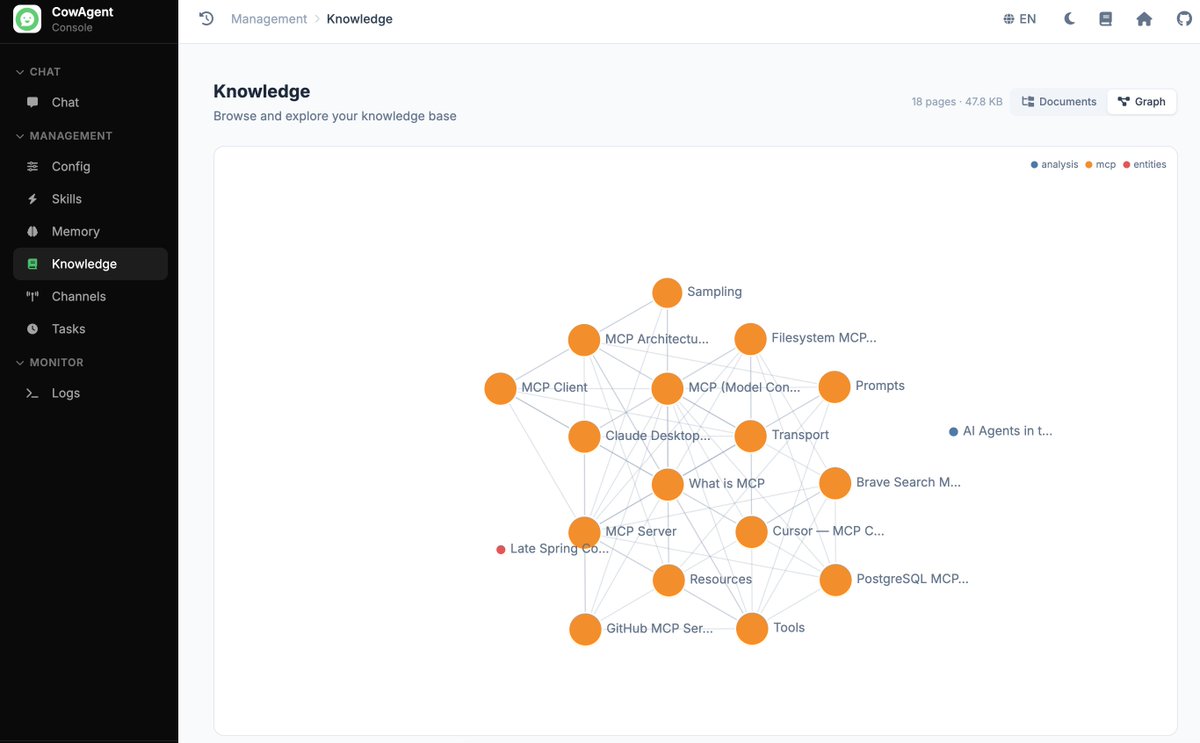
Scenario 6: very long documents
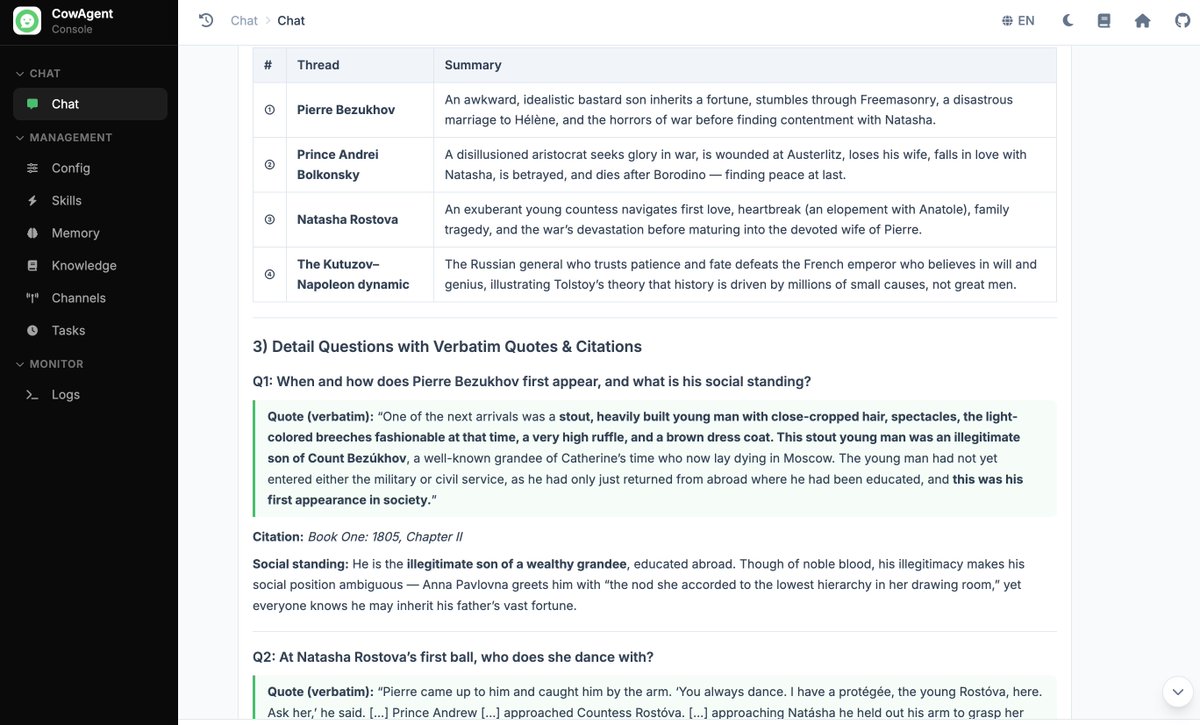
Task: have the agent fetch the full English text of War and Peace on Project Gutenberg (https://www.gutenberg.org/cache/epub/2600/pg2600.txt), around 560k words, 66,041 lines, 3.36MB, and answer: 1) the theme in one sentence; 2) four main story arcs; 3) four detail questions, each requiring a verbatim quote and a book + chapter citation. The detail questions cover Pierre's first appearance, Natasha's first ball partner, the verbatim sky description Andrei sees on the field at Austerlitz, and the philosophical theme of the final chapter.
What it stresses: global understanding of a very long document, plus precise needle-in-a-haystack retrieval, plus quote accuracy.
Numbers:
- Wall time: 94.8s
- Tool calls: 16 (bash ×14, web_fetch ×1, read ×1)
- Characters fetched: 3,359,613 (~3.36MB, 66,041 lines)
- Status: success
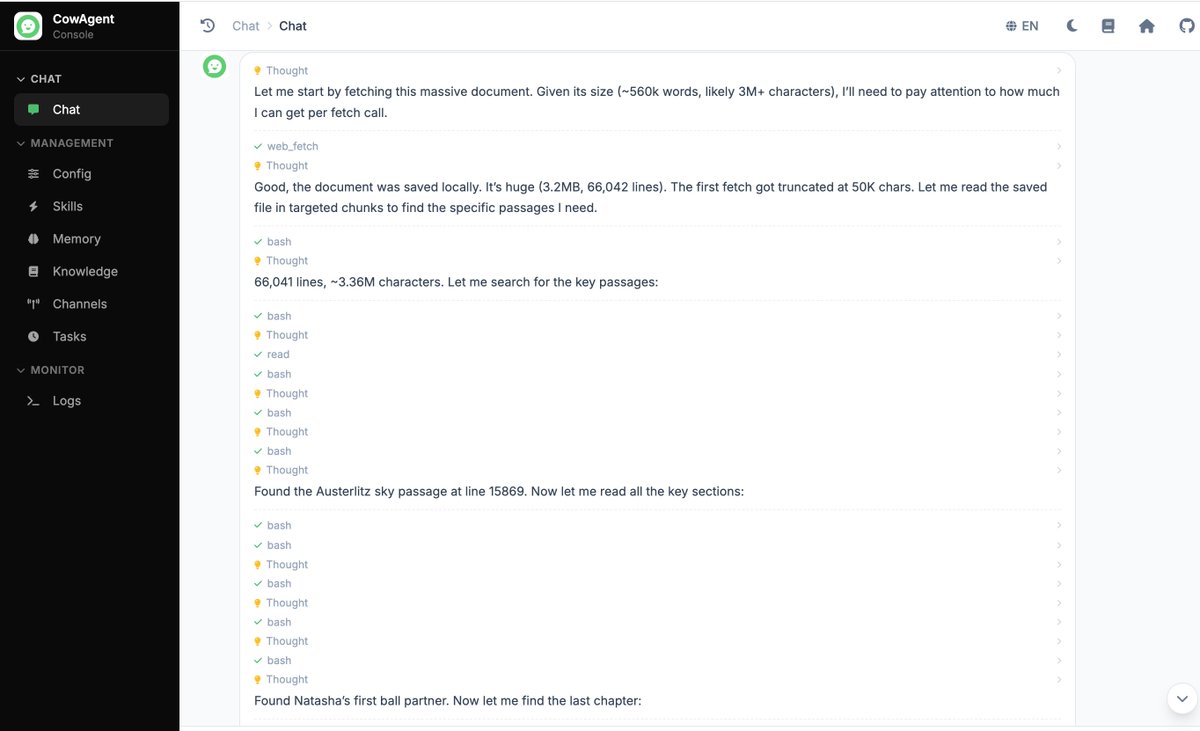
The model did not try to push the whole 3.36MB into context. Its actual strategy was: fetch the full text once, drop it on disk, keep only the first ~50k characters in context, then use shell commands to grep the local file for keywords ("Austerlitz", "lofty sky", "Natasha", "waltz", and so on), get line numbers back, and pull just the relevant ranges into context.
Final answers:
- Andrei's sky scene located at line 15869, quoted verbatim ("the lofty sky, not clear yet still immeasurably lofty, with gray clouds gliding slowly across it...").
- Pierre's first appearance pinned to Book One, Chapter II.
- Natasha's first ball pinned to Book Six, Chapter XVI, partner Andrei, with the quoted passage.
- Final chapter philosophy: free will vs. historical necessity, with a Tolstoy passage attached.
16 tool calls, completed without errors or repeated-call loops. Fetch once, search locally, read by line range — a processing pattern that keeps long documents usable within an agent loop.
In real agent workflows, stuffing a full 1M tokens into a single prompt is rarely the right move. Once a document reaches hundreds of thousands of tokens, landing it on disk and searching through it usually beats loading it whole. So this scenario is less about how large a window the model can take in, and more about whether it decides correctly when to put something into context versus reach for a tool.
Tool call timeline (fetch the text, grep for hits, read by line range):
Final answer with chapter-cited quotes:
4. Aggregate numbers
All six scenarios:
- s1 planning: success, 185.6s, 29 tool calls
- s2 complex coding: success, 200.9s, 3 tool calls
- s3 long-term memory (query): success, 133.0s, 4 tool calls
- s4 browser automation: success, 54.9s, 5 tool calls
- s5 knowledge base: success, 192.8s, 31 tool calls
- s6 very long document: success, 94.8s, 16 tool calls
Two things stand out:
- No failures or loops in this run. All six scenarios completed on the first attempt, with no infinite tool-call loops and no parsing failures; subsequent batch runs of additional tasks behaved the same way. This is a noticeable change from V3, where complex scenarios would occasionally get stuck calling the same tool repeatedly or fail to parse tool arguments.
- Latency is workable for real use. Every scenario finished in 1-4 minutes, with intermediate steps streaming out so the user can see thinking and actions as they happen.
5. Conclusion
Across these six scenarios, V4 Flash completed every task and was stable enough, in our runs, to serve as a default model. The heaviest ones — s5 with 31 tool calls and s1 with 29 — ran end-to-end without breaking down. Planning, coding, memory, browser, knowledge base, and long documents all completed; long-term memory and long-document handling were the smoothest. Cost is part of the picture too: a single agent task often fires dozens of LLM calls, so per-token price weighs heavily in a default-model choice, and Flash's price-to-capability ratio at this point makes it a reasonable everyday default.
Flash is not without rough edges. It can drop a fine-grained constraint, such as the "zero external dependencies" requirement in s2 where it still loaded chart.js from a CDN. For tasks with hard constraints, Pro with reasoning_effort=max may hold the line better, though we did not test that here. CowAgent will keep adding batch task suites and cross-model comparisons, with the goal of building a reusable agent-capability eval set over time.
Note: this is an internal eval write-up from the CowAgent maintainers, not an official benchmark. Numbers were collected in CowAgent's web console with the settings listed below; different prompts, skill sets, or environments may give different results.